
Connect and Engage with ABCDate Community
Overview
ABCDate is a desktop application designed for participants of the ABCDate community, offering a centralized platform to enhance social interaction and event coordination. The software enables users to stay connected through real-time chat with direct message notifications, manage personal profiles, and explore other participants’ profiles. With integrated calendar functionality, users can view upcoming ABCDate events and plan their participation.
The app also features a bulletin board for posting and reading stories, fostering community engagement. Additionally, users can schedule physical activities with fellow participants, promoting in-person connections. This tool is tailored for individuals seeking a dynamic, interactive experience within the ABCDate network.
Its focus on real-time communication and event planning makes it ideal for active community members who value both digital and physical interaction. The developer, ABCDate Inc., emphasizes seamless integration between social features and event management. The application supports both Windows and Mac operating systems, ensuring broad accessibility.
While specific use cases are not detailed, the software appears well-suited for users involved in community-driven events, group activities, or social gatherings. The developer did not provide additional system requirements.
Key Features & Capabilities
- Real-Time Chat with Direct Message Notifications – Enables instant communication between users with timely alerts for new messages, ensuring no interaction is missed.
- Profile Management – Allows users to create, edit, and maintain personal profiles, including biographical details and interests.
- Participant Profile Search and Viewing – Provides tools to search for and view other users’ profiles, facilitating connections within the community.
- Calendar Integration for Upcoming Events – Displays a synchronized calendar of ABCDate events, helping users plan their participation.
- Bulletin Board for Stories – Offers a shared space where users can post and read community stories, promoting shared experiences and engagement.
- Activity Scheduling with Other Participants – Supports the coordination of physical meetups and group activities, enhancing real-world interaction.
These features collectively support a cohesive community experience. For example, a user can browse profiles to find others with similar interests, initiate a direct message, and then coordinate a joint activity through the calendar. The bulletin board allows users to share event highlights or personal updates, strengthening community bonds.
The integration of messaging, scheduling, and event visibility streamlines user workflows. While the app’s functionality is centered on social and event-related tasks, the developer did not specify performance details or advanced customization options. Users benefit from a unified interface that reduces the need to switch between multiple platforms for community engagement.
User Interface, Workflow & Performance
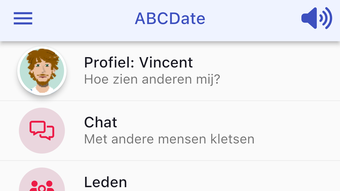
The user interface of ABCDate is structured to prioritize accessibility and intuitive navigation. Core functions such as messaging, profile management, calendar access, and the bulletin board are likely organized within a centralized dashboard. Navigation appears to be streamlined, allowing users to move between features with minimal clicks.
The workflow supports a natural progression from profile discovery to communication and event planning. Users can initiate conversations, view event schedules, and post updates without leaving the main interface. The application’s performance is expected to be stable, given its focused feature set and moderate size of 150 MB.
However, exact performance details were not specified. The developer did not provide information on CPU or RAM usage, nor did they mention stability under prolonged use. Resource consumption patterns are unknown.
General software behavior suggests efficient operation on modern systems, but this remains unverified. The application does not appear to include heavy multimedia processing or background tasks, which may contribute to consistent performance. Users can expect a responsive experience during typical use, though real-world testing would be needed to confirm this.
Compatibility & System Requirements
ABCDate is available for both Windows and Mac operating systems, making it accessible to a wide range of users. The software is currently released in version 1.2.3, with an installation size of 150 MB. This size suggests a lightweight application that does not require extensive disk space.
The developer did not specify exact system requirements, including minimum processor speed, RAM, or storage. Compatibility information is limited to the supported platforms. No mention was made of hardware acceleration, GPU requirements, or background service dependencies.
Users should ensure their systems meet standard desktop application requirements to run the software smoothly. The developer did not provide additional system requirements. For users on older systems, performance may vary without clear guidance.
The application is designed for desktop environments, indicating it does not support mobile or tablet platforms.
Pros and Cons
Pros
- Intuitive interface for seamless navigation across social and event features
- Real-time chat with direct message notifications for timely communication
- Integrated calendar for easy event tracking and planning
- Supports physical activity scheduling to encourage in-person engagement
- Free to download and use, removing financial barriers to entry
- Bulletin board enhances community storytelling and interaction
Cons
- Exact system requirements were not listed, limiting compatibility assessment
- Performance details and resource usage were not provided
- Limited information on update frequency or release cycle
- No details on offline functionality or data synchronization
- Developer background beyond ABCDate Inc. is not available
FAQ Section
Is ABCDate available for both Windows and Mac?
Yes, ABCDate is compatible with both Windows and Mac operating systems, ensuring broad accessibility for desktop users.
Is the software free to use?
Yes, ABCDate is available at no cost. There are no subscription fees or in-app purchases required for core functionality.
Can I use ABCDate without an internet connection?
The application requires an active internet connection for full functionality, including messaging, event updates, and profile synchronization. Offline usage details were not specified.
How often are updates released?
Update frequency was not disclosed. Users should check the official website or in-app notifications for the latest version.
Is my data secure when using ABCDate?
Security measures were not detailed in the provided information. The developer did not specify encryption protocols or data handling practices.
Final Thoughts + CTA
ABCDate presents a focused and accessible desktop solution for community members seeking to connect, communicate, and participate in shared events. With its integration of real-time chat, profile management, calendar tracking, and activity scheduling, the software offers a comprehensive platform for social engagement. The absence of cost removes a major barrier to adoption, while the desktop format ensures a stable, distraction-free experience.
Although detailed technical specifications are limited, the application’s design suggests a user-friendly workflow tailored for active participants. The lack of system requirements and performance data may pose challenges for users on older hardware, but the moderate file size indicates efficient resource use. For individuals involved in the ABCDate community, this tool serves as a valuable hub for interaction and coordination.
The developer’s commitment to a unified experience is evident in the feature set. Download ABCDate now to stay connected and engaged with your community.







